
Layout generator · Beta
Design the whole page. Down to the pixel.
Start with an executive-grade dashboard layout. Move and resize panels, explore different compositions, and export clean SVG or PNG backgrounds straight from your browser. No code, installation or account.
Four layouts to start from
See exactly what it writes.
Each layout is one JSON file in the download. These are the files the generator wrote from them.
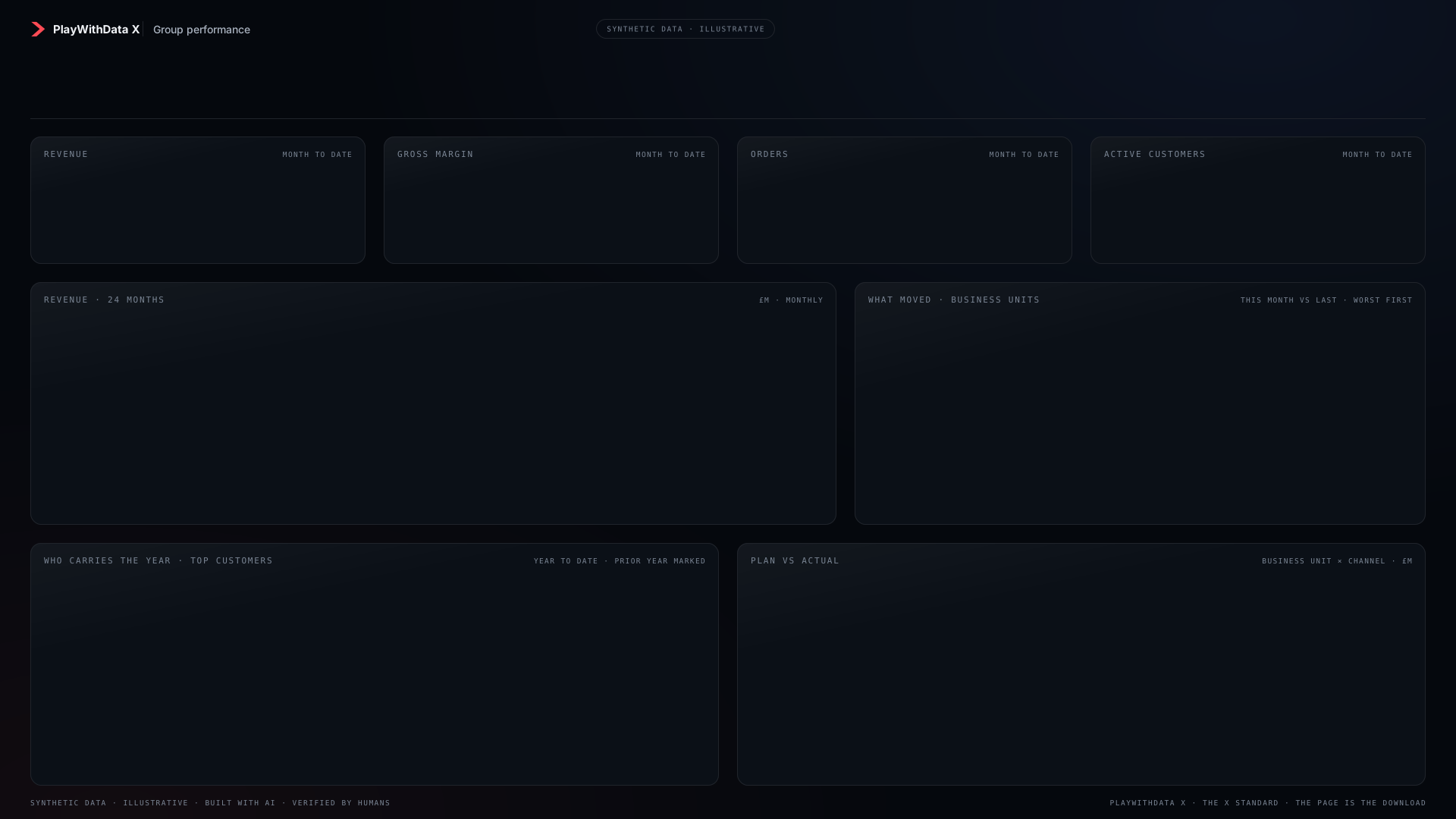
The layout The Page V0.7 is built on: four KPI panels, a trend, a ranked list, a table and a matrix. Dark, 1920 × 1080.
Config layout.json · canvas 1920 × 1080 · 8 panels · 14 slots
| Slot | x | y | Width | Height |
|---|---|---|---|---|
| 362 | 25 | 236 | 26 | |
| 610 | 25 | 164 | 26 | |
| 1500 | 20 | 380 | 36 | |
| 40 | 70 | 1400 | 46 | |
| 40 | 118 | 1400 | 24 | |
| 58 | 220 | 406 | 114 | |
| 524 | 220 | 406 | 114 | |
| 990 | 220 | 406 | 114 | |
| 1456 | 220 | 406 | 114 | |
| 58 | 412 | 1027 | 266 | |
| 1145 | 412 | 717 | 266 | |
| 58 | 756 | 872 | 266 | |
| 990 | 756 | 872 | 266 | |
| 785 | 412 | 300 | 80 |
Exports
Four outputs, and what each needs.
PWDX-Background.svg
The page chrome: ground, header, every panel with its kicker and meta, the footer.
Needs · Python 3
positions.json
Every panel box and every visual slot box, in pixels.
Needs · Python 3
PWDX-Background.png
The SVG rasterised at 2×, ready to set as the page’s background image.
Needs · Node 18+ and Playwright with Chromium
visual.json position blocks
In a PBIR report, each mapped visual’s x, y, width and height, rewritten from the config. --check verifies them.
Needs · A PBIR report and a slot map
Nothing else is exported.
Run it
Three commands to run it.
Unzip, open a terminal in the folder. Validate the config, write a layout, and let the generator check itself. The README in the download covers the PNG, the config keys and the Power BI report mode.
python3 generate.py --validate
python3 generate.py --config templates/light-1280.json --out-dir out --no-png --no-pbir
python3 check_generator.py
Free to use and adapt (MIT licence in the download). No account, no tracking.
How it is checked
It proves itself, and the build re-proves it.
Each check has a control that must fail when the thing it guards is broken. The same suite runs on every build of this site, from the unzipped download.
- 01
Every layout validates with no warnings, and a config is refused before anything is written: a missing key, a colour that is not #RRGGBB, a span outside the grid, a duplicate id, an unknown panel, overlapping panels or slots, a box outside the canvas, an id or path that could carry markup, control characters, oversize input.
- 02
previews/ equals what the generator writes from each layout today, byte for byte, and two runs give identical bytes.
- 03
In a Power BI report, a visual moved by one pixel is caught by generate.py --check, and a generate run puts it back.
- 04
A grid that does not add up to the canvas height is reported, not silently clipped.
- 05
The packaged download is checked as a visitor gets it: exactly the listed files, no internal string or absolute path, and its own check passing from the unzipped copy.
Limits
What it will not do.
- 01
This page shows files the generator wrote. It does not run the generator in your browser. To change a layout, edit the JSON and run the script.
- 02
The PNG needs Node and Playwright. Without them, use --no-png: the SVG and positions need only Python 3.
- 03
Fonts are not embedded. The SVG and PNG name Segoe UI and Consolas; elsewhere the browser falls back, so a PNG drawn on Linux or macOS is a preview. Draw the shipping PNG on Windows.
- 04
The three new layouts are backgrounds and boxes, not finished reports, and they were not opened in Power BI Desktop. The PBIR positions mode was confirmed on Desktop only through The Page V0.7.
- 05
Run only layout files you trust. The generator refuses markup in ids and paths and escapes what it writes, but it is a layout tool, not a sandbox.
- 06
Power BI Service rendering is untested.
Built with AI. Verified by humans.